Sometimes it is useful to pause your administration, for example if you are going on holiday and the bookkeeping is not being updated by a colleague. This prevents reminders from being sent incorrectly.
Good to know: You can only pause and resume an administration on the spot. It is not possible in Payt to schedule a pause, so the administration is automatically paused and resumed at a predetermined time.
How do I pause or resume a single administration?
- Go to the administration settings via the cogwheel icon in the top right-hand corner.

- Open the 'Invoicing' tab on the left-hand side.
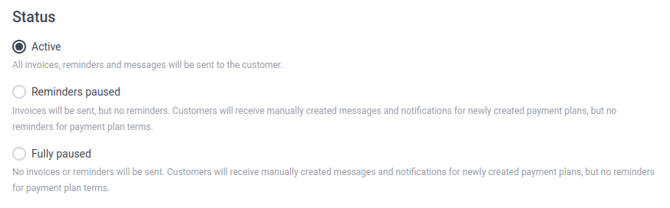
- At the top of the page, select the status the administration should have.
- The status 'Active' means that all communication is sent automatically. You can also use this status to resume the administration if it was previously paused.
- The status 'Reminders paused' means that invoices are sent, but reminders and notices are not.
- The status 'Fully paused' means that invoices, reminders, and notices are not sent.
- Save your changes at the bottom of the page.

Please note: Even if the administration is fully or partially paused, manually created messages and newly created payment plans are still sent to the Customer. Payment reminders for payment plans are not sent.
How do I pause or resume multiple administrations at the same time?
- Click on the Payt logo in the top left-hand corner to open the organisation dashboard.
- Tick the administrations for which you want to change the status.
- Select 'Bulk actions' in the top right-hand corner and choose the desired status: pause, resume, or pause reminders.
My administration is locked, how can I set it live?
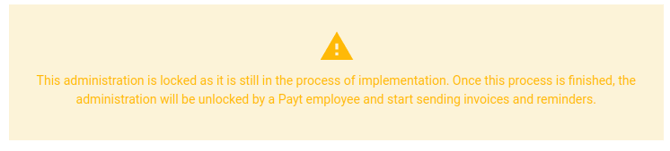
You will see the message below if your administration is locked. You cannot resume it yourself, because a Payt employee must first perform an action. Please contact your implementation specialist or the Payt service desk.